
Team Workload & Capacity Telemetry
Managing resources across multiple spaces and projects is a major hurdle for agencies. WorkFuz includes an intelligent Team Workload Sentinel that tracks scheduled hours across all initiatives against a standard 40-hour work week.
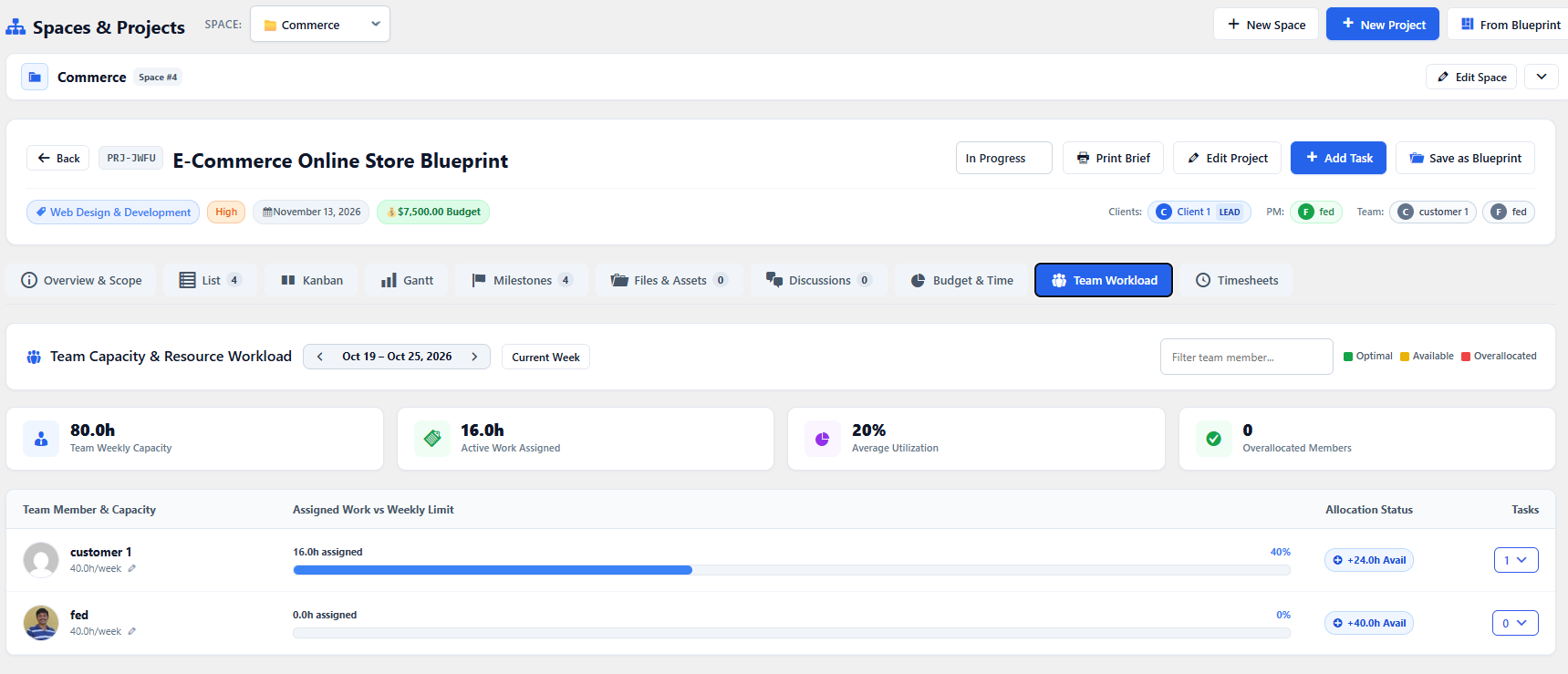
The Workload Dashboard
Section titled “The Workload Dashboard”Navigate to the Team Workload tab to view your entire roster:
- Capacity Meter Bar: Visual progress bar showing the percentage of weekly hours scheduled.
- Color-Coded Status Badge:
- 🟢 Available (< 70%): Bandwidth is open for new assignments.
- 🔵 Balanced (70% - 99%): Well-paced sprint workload.
- 🔴 Over-Allocated (100%+): Immediate alert to avoid developer burnout.
- Logged vs Estimated: Hours actively worked this week versus total active ticket commitments.
Collapsible Cross-Project Task Breakdown
Section titled “Collapsible Cross-Project Task Breakdown”Click on any team member’s card to expand their Assigned Tasks Tray:
- Shows every active task currently assigned to them.
- Each item features a distinct
📁 [Project Title]badge, revealing tasks across other projects and spaces. - Displays ticket reference, estimated hours, and due dates.
1-Click Quick Reassignment
Section titled “1-Click Quick Reassignment”If a team member is over-allocated:
- Expand their task tray.
- Next to any pending ticket, select a different available member from the Reassign to… dropdown.
- The task transfers immediately via AJAX, updating the workload telemetry meters in real time.